Rooms, Sessions, Participants, and Streams
Understand the core objects that make up a VideoSDK call or live stream: rooms, sessions, participants, and streams.
A room provides the persistent meeting space, a session represents one live occurrence inside that room, participants join the session, and participants can publish streams such as audio, video, and screen share.
Core concepts
| Object | Description |
|---|---|
| Room | A reusable meeting space identified by a roomId. Participants use the room ID to join calls or streams. |
| Session | One live occurrence of a room, beginning when the first participant joins and ending when the session is closed. |
| Participant | A person or service connected to the session, such as a user, AI agent, SIP caller, or recorder. |
| Stream | Media published by a participant, such as microphone audio, camera video, or screen share. |
How they work together
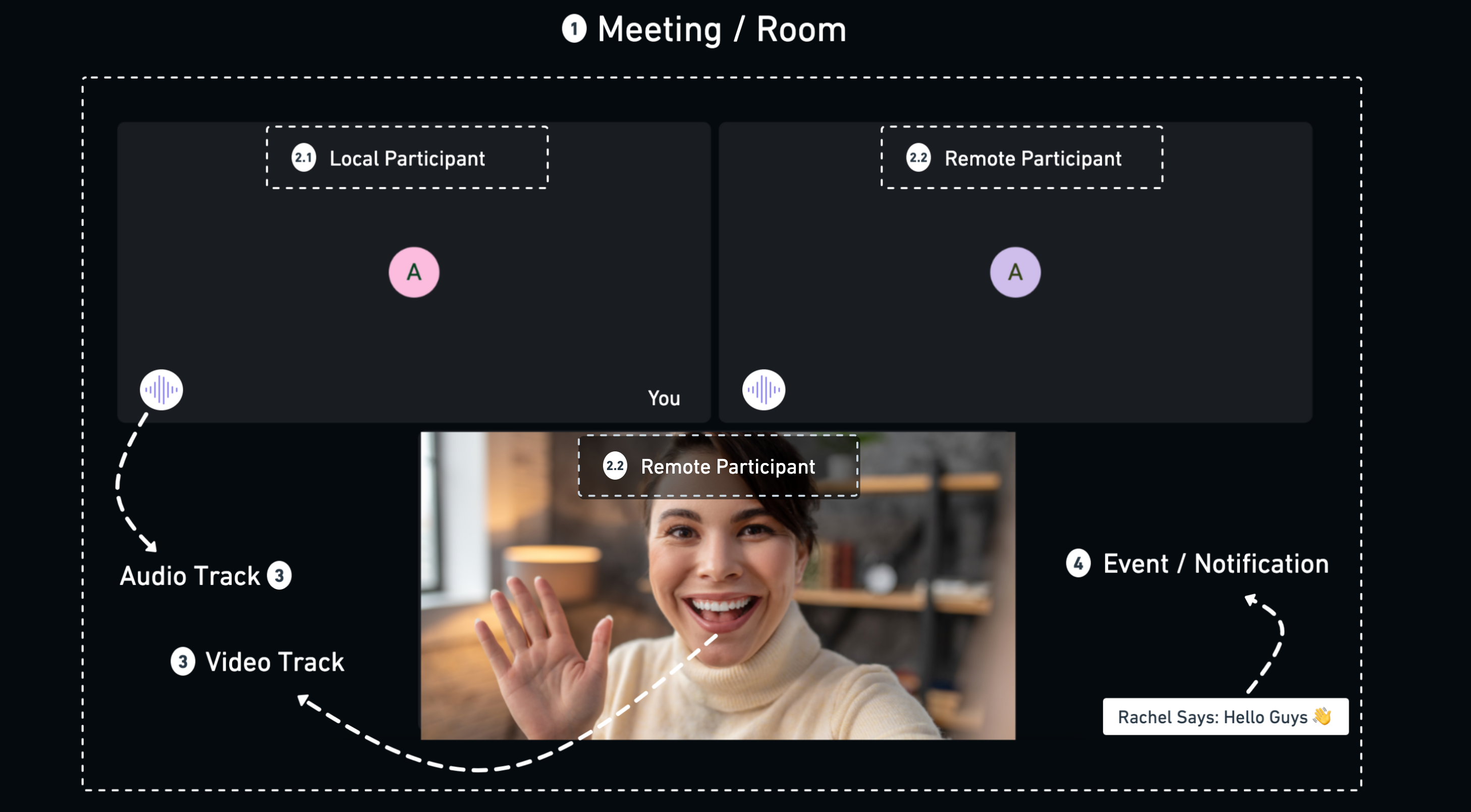
When you join a room, the SDK represents you as the local participant. Everyone else connected to the same session is a remote participant.
Participants can publish audio, video, and screen-share tracks. The client SDK exposes these media tracks through streams.
Changes inside the session are exposed to your application through SDK events. For example, your application can respond when:
- A participant joins or leaves.
- A participant enables or disables their microphone or camera.
- A screen share starts or stops.
- The session connection state changes.
Rooms and sessions
A room is reusable, while a session represents a single live occurrence of that room.
For example, a team can use the same roomId for a weekly standup. Each weekly call creates a separate session while the room ID remains unchanged.
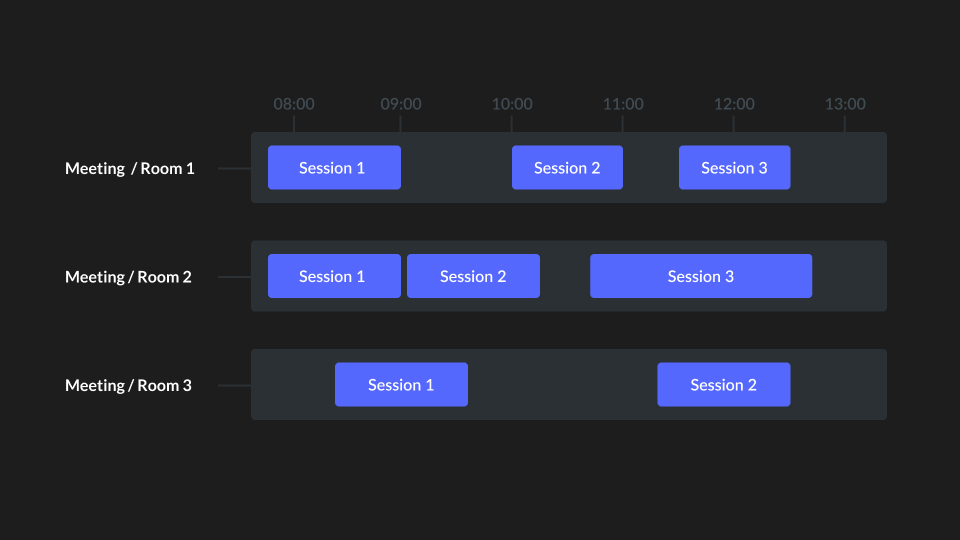
VideoSDK manages the session lifecycle automatically.
| Event | Result |
|---|---|
| The first participant joins an inactive room | A new session starts. |
| The last participant leaves | The active session ends. |
| A moderator or server ends the active session | The session ends for all connected participants. |
| The room is disabled from the server | The active session ends and the room can no longer be used for future sessions. |
This separation allows a single room to support multiple independent sessions over time.
Room and meeting terminology
In VideoSDK client SDKs, some APIs use the term meeting to represent the room a participant has joined.
For example, the React SDK includes APIs such as:
MeetingProvideruseMeetingonMeetingJoinedmeetingId
In these APIs, meetingId refers to the same identifier as roomId.
meetingId = roomId
The documentation generally uses room when describing the VideoSDK resource and meeting where it matches the naming used by a specific client SDK.
Participant modes
Each participant has a mode that controls whether they can publish or receive realtime media.
The mode can be configured when the participant joins and changed later. For example, an audience member in an interactive live stream can initially join as a viewer and later be promoted to a speaker.
| Mode | Publish media | Receive media | Typical use |
|---|---|---|---|
SEND_AND_RECV | Yes | Yes | Hosts, speakers, and participants in a video call. This is the default mode. |
RECV_ONLY | No | Yes | Viewers who receive realtime audio and video without publishing their own media. |
SIGNALLING_ONLY | No | No | Participants who use signalling features such as chat, polls, or reactions without sending or receiving realtime media. |
Participant mode affects realtime media transport. Application-level features such as messaging or reactions can continue to work independently of published media.
Where each object is managed
Rooms, sessions, participants, and streams are managed through different parts of the VideoSDK platform.
| Object | Client SDK | Server SDK / REST API | Webhooks |
|---|---|---|---|
| Room | Join and leave a room. | Create, retrieve, validate, list, and disable rooms. | - |
| Session | Receive events related to the active session. | Retrieve session information, list previous sessions, and end an active session. | session-started, session-ended |
| Participant | Access participant information, manage media, change modes, and perform moderation actions. | List, retrieve, and remove participants. | participant-joined, participant-left |
| Stream | Publish and receive audio, video, and screen-share streams; pause streams and control quality. | - | - |
Streams exist as part of the realtime client connection, so media stream operations are handled through the client SDK rather than the REST API.
Next steps
Room management
Create, retrieve, validate, list, and manage rooms and sessions from your server.
Participant management
Access participant information, change participant modes, and moderate participants.
Stream management
Publish and receive microphone, camera, and screen-share streams and control media quality.
Webhooks
Receive server-side events when sessions start or end and participants join or leave.

