Post Transcription & Summary - React Native
Post transcription turns a recording or an HLS stream into text after it ends. You can also ask for a summary.
This page uses the following asynchronous methods. Refer to their API reference for the errors each Promise may reject with, and handle these rejections appropriately based on your use case.
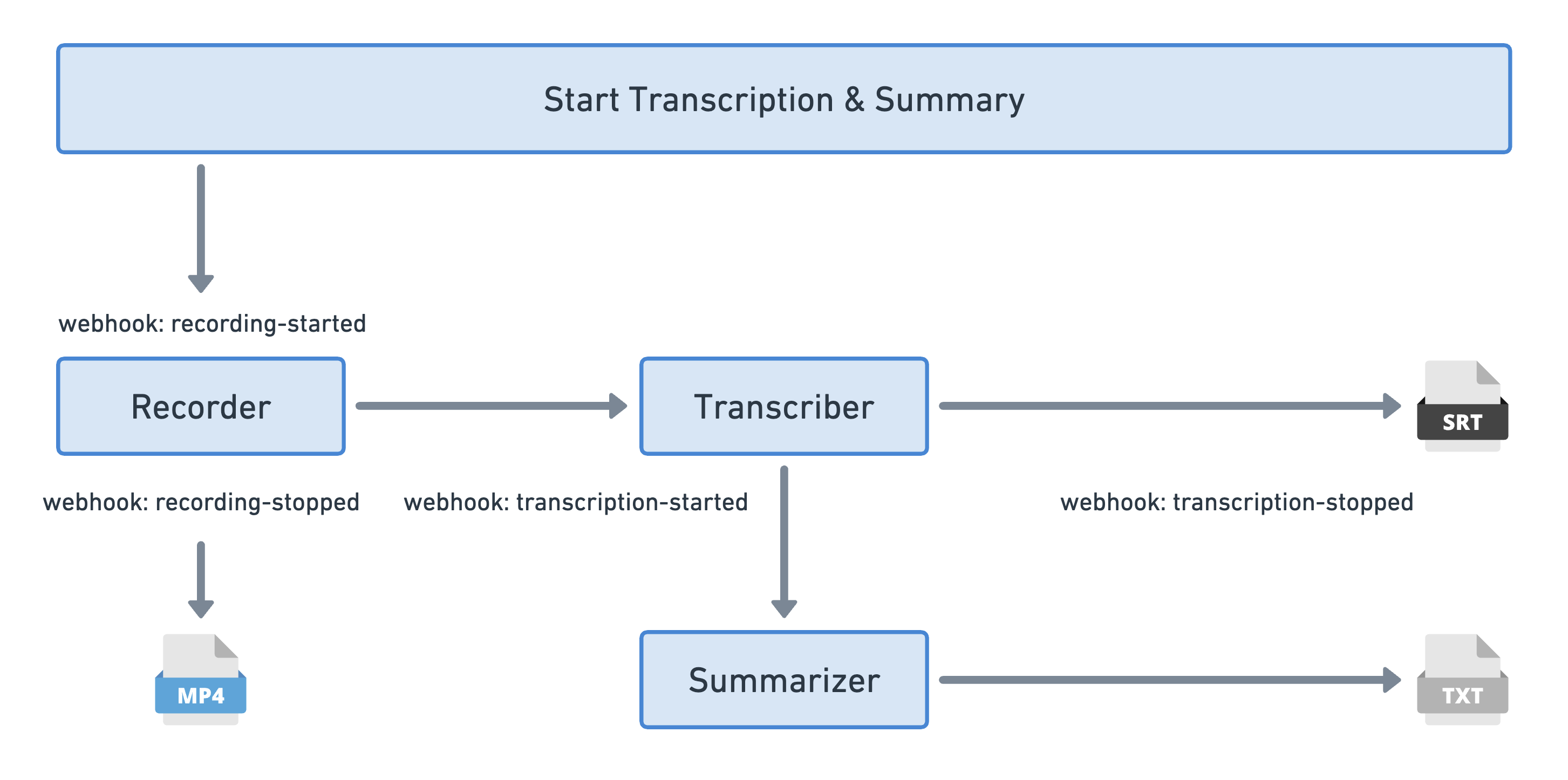
A recording started with transcription and summary turned on sends a webhook when it starts and another when it stops. A webhook follows when the transcription is ready, and a last one when the summary is ready.
Pass a transcription configuration as the last argument of startRecording() or startHLS() from the useRoom hook:
enabled: Set it totrueto transcribe the recording.summary: Setenabled: trueto also get a summary.promptguides what the summary covers.modelId(optional): The transcription model to use. Leave it out for the default.
import { useRoom } from "@videosdk.live/react-native-sdk";
import { TouchableOpacity, Text } from "react-native";

const RecordingControls = () => {
  const { startRecording, stopRecording } = useRoom();

  const handleStartRecording = async () => {
    const transcription = {
      enabled: true,
      summary: {
        enabled: true,
        prompt:
          "Write summary in sections like Title, Agenda, Speakers, Action Items, Outlines, Notes and Summary",
      },
    };

    try {
      // Pass null for the webhook URL and the storage path you do not use
      await startRecording(
        null,
        null,
        {
          layout: { type: "GRID", priority: "SPEAKER", gridSize: 4 },
          theme: "DARK",
          mode: "video-and-audio",
          quality: "high",
          orientation: "portrait",
        },
        transcription
      );
    } catch (err) {
      console.error("startRecording failed:", err);
    }
  };

  const handleStopRecording = async () => {
    try {
      await stopRecording();
    } catch (err) {
      console.error("stopRecording failed:", err);
    }
  };

  return (
    <>
      <TouchableOpacity onPress={handleStartRecording}>
        <Text>Start Recording</Text>
      </TouchableOpacity>
      <TouchableOpacity onPress={handleStopRecording}>
        <Text>Stop Recording</Text>
      </TouchableOpacity>
    </>
  );
};
After the recording stops, fetch the transcription and summary with the Post Transcription API. It returns the transcription status, the transcription files in JSON, SRT, TXT, TSV and VTT, and the summary file:
{
  "id": "40b0a4ed-9842-40c9-a288-e4b1bf98a90a",
  "status": "completed",
  "roomId": "abc-xyzw-lmno",
  "sessionId": "621497578bea0d0404c35c4c",
  "recordingId": "65d303d6d2c373dfd71b38a2",
  "filePath": "https://cdn.videosdk.live/encoded/videos/dummy.mp4",
  "transcriptionFilePaths": {
    "json": "https://cdn.videosdk.live/transcriptions/dummy/dummy.json",
    "srt": "https://cdn.videosdk.live/transcriptions/dummy/dummy.srt",
    "txt": "https://cdn.videosdk.live/transcriptions/dummy/dummy.txt",
    "tsv": "https://cdn.videosdk.live/transcriptions/dummy/dummy.tsv",
    "vtt": "https://cdn.videosdk.live/transcriptions/dummy/dummy.vtt"
  },
  "summarizedFilePaths": {
    "txt": "https://cdn.videosdk.live/transcriptions/dummy/dummy-summary.txt"
  },
  "userStorage": null,
  "start": "2024-02-27T16:00:36.828Z",
  "end": "2024-02-27T16:01:46.939Z"
}
The transcription can take a while to be ready after the recording stops. The delay depends on server load and the length of the room.
You can also start the recording with the Start Recording API and pass transcription, or set transcription under recording in autoStartConfig when you create the room.
API Reference
The API references for all the methods and events utilized in this guide are provided below.
Got a Question?  Ask us on discord

