Invite Guest on Stage - iOS
In this guide, we will see how you can request a viewer to join your livestream by using changeMode().
Mode.CONFERENCE and Mode.VIEWER were removed in 4.0.0. Use SEND_AND_RECV instead of CONFERENCE, and SIGNALLING_ONLY instead of VIEWER.
Let's first have a look at how we will be using the PubSub mechanism to achieve the requesting and switching of the participant's mode.

Before going forward in this guide, do make sure all the attendees join the live stream with mode as SIGNALLING_ONLY and the host joins with mode as SEND_AND_RECV
Step 1: Loading Viewer List
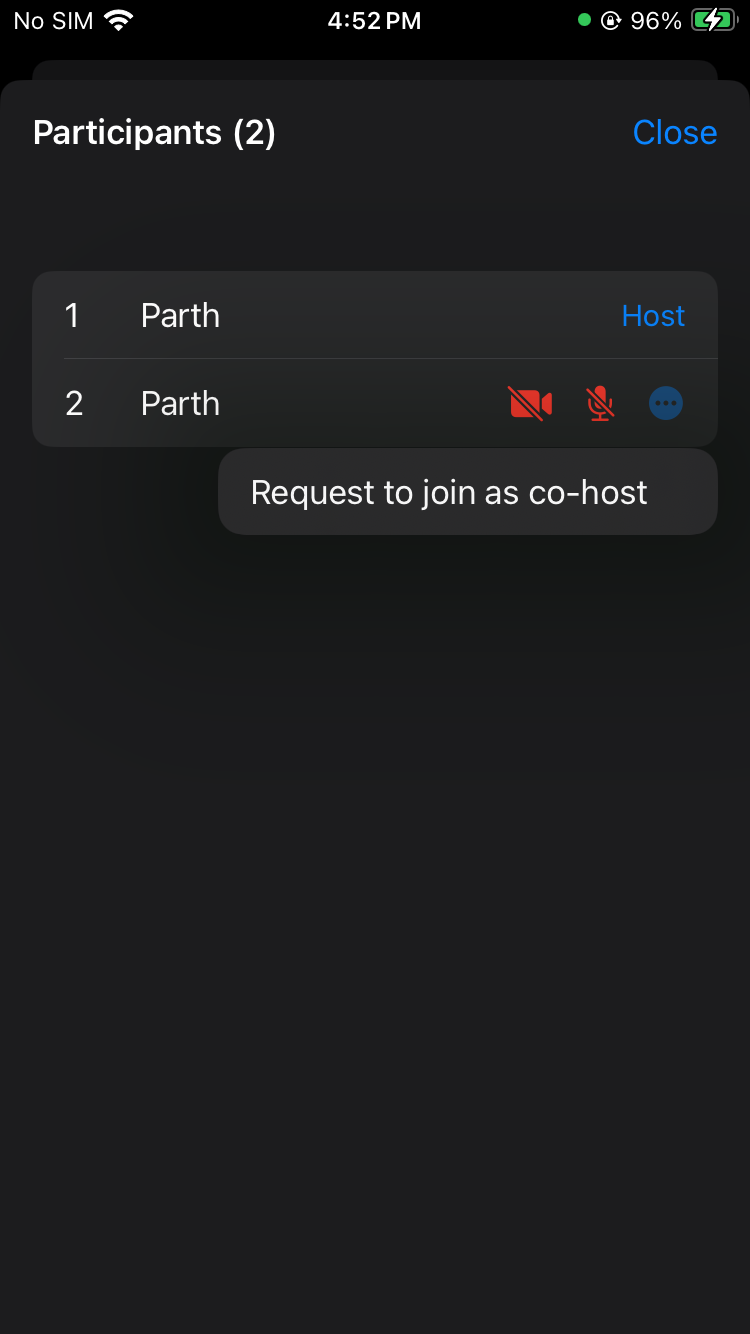
The host will see a list of participants who have joined as SIGNALLING_ONLY along with a button that, when selected, will invite that user to join the livestream.
Here we are using List to display viewer list with button.
struct ParticipantListView: View {
    let participants: [Participant]
    let participantCameraStatus: [String: Bool]
    let participantMicStatus: [String: Bool]
    let onClose: () -> Void
    let sendHostRequest: (Participant) -> Void

    @State private var requestedParticipantId: String?

    var body: some View {
        VStack(alignment: .leading) {
            HStack {
                Text("Participants (\(participants.count))")
                    .font(.headline)
                Spacer()
                Button("Close") {
                    onClose()
                }
                .foregroundColor(.blue)
            }
            .padding()

            List {
                ForEach(participants.indices, id: \.self) { index in
                    HStack {
                        Text("\(index + 1)")
                            .frame(width: 30, alignment: .leading)

                        // Participant name
                        Text(participants[index].displayName)
                            .frame(maxWidth: .infinity, alignment: .leading)

                        // Show "Host" or "Requested" tag
                        if participants[index].id == requestedParticipantId {
                            Text("Requested")
                                .font(.subheadline)
                                .foregroundColor(.orange)
                        } else if participants[index].mode == .SEND_AND_RECV {
                            Text("Host")
                                .font(.subheadline)
                                .foregroundColor(.blue)
                        }
                        if participants[index].isLocal != true {
                            // Camera status
                            Image(
                                systemName: participantCameraStatus[
                                    participants[index].id
                                ] ?? false ? "video.fill" : "video.slash.fill"
                            )
                            .foregroundColor(
                                participantCameraStatus[participants[index].id]
                                    ?? false ? .green : .red
                            )

                            // Mic status
                            Image(
                                systemName: participantMicStatus[
                                    participants[index].id
                                ] ?? false ? "mic.fill" : "mic.slash.fill"
                            )
                            .foregroundColor(
                                participantMicStatus[participants[index].id]
                                    ?? false ? .green : .red
                            )
                            .frame(width: 30)

                            // Option button to show options
                            Menu {
                                Button("Request to join as co-host") {
                                    requestedParticipantId =
                                        participants[index].id
                                    sendHostRequest(participants[index])
                                    onClose()
                                }
                            } label: {
                                Image(systemName: "ellipsis.circle.fill")
                                    .foregroundColor(.blue)
                            }
                        }
                    }
                    .padding(.vertical, 5)
                }
            }
        }
    }
}
- When the host taps the option menu button, they can send the viewer a request to become a co-host over PubSub. The viewer can then accept or reject the request.
- Swift
struct LiveStreamView: View {
  @StateObject var controller: LiveStreamViewController
  @State private var showOptionSelector = false
  @State private var showParticipantsList = false

   var body: some View {
        VStack {
          //...
          Button {
              showOptionSelector = true
          } label: {
              Image(systemName: "ellipsis")
                  .font(.system(size: 20))
                  .frame(width: 45, height: 45)
                  .background(Color.white.opacity(0.3))
                  .clipShape(RoundedRectangle(cornerRadius: 10))
                  .foregroundColor(.white)
          }
          .confirmationDialog(
              "Select an Option", isPresented: $showOptionSelector) {
              //Other options...
              Button("Show Participants List") {
                  showParticipantsList = true
              }
              Button("Cancel", role: .cancel) {}
          }
          //...
        }
        .sheet(isPresented: $showParticipantsList) {
            ParticipantListView(
                participants: controller.participants,
                participantCameraStatus: controller
                    .participantCameraStatus,
                participantMicStatus: controller
                    .participantMicStatus,
                onClose: { showParticipantsList = false },
                sendHostRequest: controller.sendTheHostRequest
            )
        }
   }
}
Step 2: Requesting a Viewer to Join Livestream
We have a Viewer list ready. Now, let us handle the click event for sending the request.
We will be using HOSTREQUESTED as the topic for PubSub. The request carries the host's own name and ID from room.localParticipant, so the viewer knows who to reply to.
- Swift
// sendTheHostRequest implementation to send request
func sendTheHostRequest(_ participant: Participant) {
    let message = "Request to change your mode"
    let senderName = room?.localParticipant.displayName ?? "Unknown"
    let senderId = room?.localParticipant.id ?? "Unknown"
    let payload = [
        "receiverId": participant.id,
        "senderName": senderName,
        "senderId": senderId,
    ]
    Task {
        do {
            try await self.room?.pubSub.publish(
                topic: "HOSTREQUESTED",
                message: message,
                options: PubSubPublishOptions(),
                payload: payload
            )
        } catch {
            print("Error while sending request to become host: \(error)")
        }
    }
}
Step 3: Showing Viewer Request Dialog
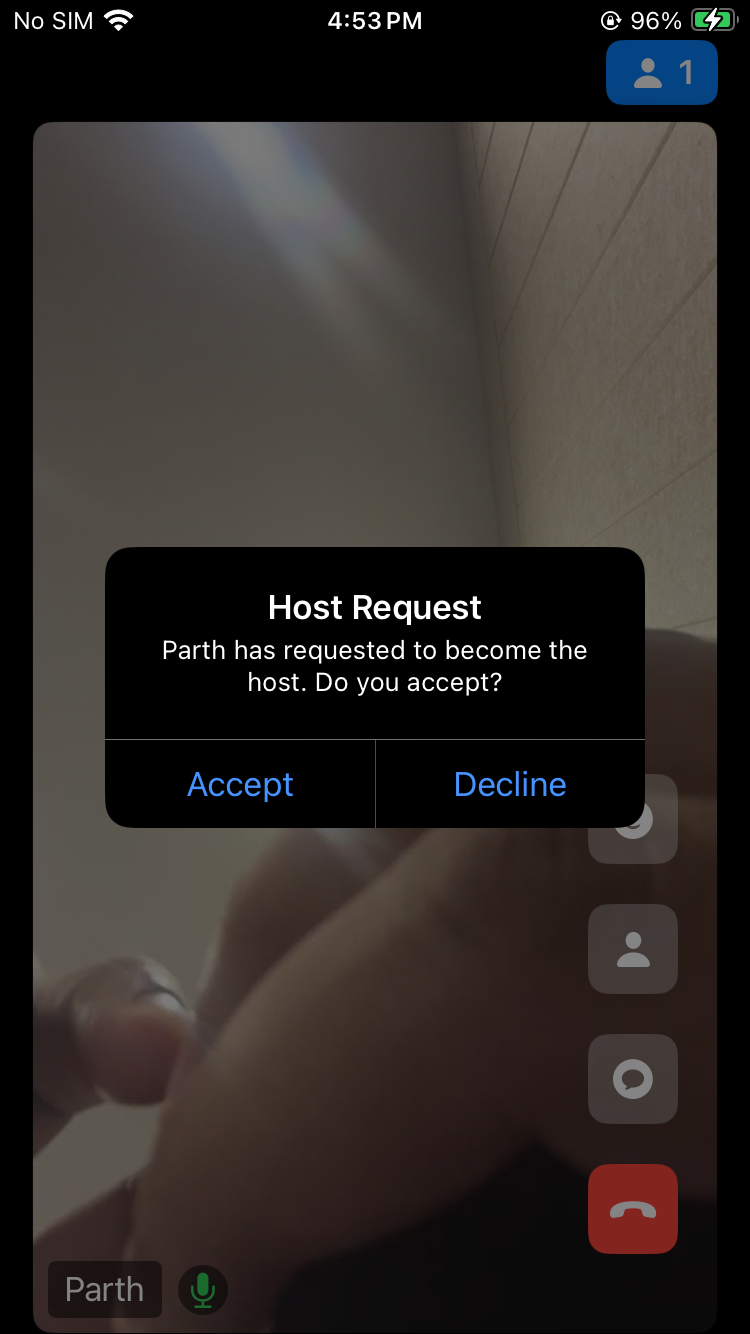
Now that the host can send a request, display the request dialog to the viewer and switch their mode from SIGNALLING_ONLY to SEND_AND_RECV.
changeMode(_:) is async throws, so the viewer calls it with try await inside a Task. It throws ERROR_ALREADY_IN_REQUESTED_STATE if the viewer is already in SEND_AND_RECV mode. After the switch, the SDK turns the mic and camera back on the way the viewer last had them. A viewer who has never been on stage gets what micEnabled and camEnabled of createRoom() asked for. Both default to true. If your viewers join with them set to false, call unmuteMic() and enableCam() after the switch.
- Swift
struct LiveStreamView: View {
  @StateObject var controller: LiveStreamViewController

  var body: some View {
      VStack {
        //...
      }
      .alert(isPresented: $controller.showAlert) {
            if controller.showActionButtons {
                return Alert(
                    title: Text(controller.alertTitle),
                    message: Text(controller.alertMessage),
                    primaryButton: .default(Text("Accept")) {
                        self.controller.acceptHostChange()
                    },
                    secondaryButton: .default(Text("Decline")) {
                        self.controller.declineHostChange()
                    }
                )
            } else {
                return Alert(
                    title: Text(controller.alertTitle),
                    message: Text(controller.alertMessage),
                    dismissButton: .default(Text("Okay")) {
                        self.controller.showAlert = false
                    }
                )
            }
        }
  }

}

class LiveStreamViewController: ObservableObject {
  //...
  @Published var showAlert = false
  @Published var alertTitle = ""
  @Published var alertMessage = ""
  @Published var showActionButtons = false
  // ID of the host who sent the request
  var requestFrom: String?

  func showHostRequestAlert(participantId: String, participantName: String) {
      self.alertTitle = "Host Request"
      self.alertMessage =
          "\(participantName) has requested to become the host. Do you accept?"
      self.showAlert = true
      self.showActionButtons = true
  }

  func acceptHostChange() {
        let senderName = room?.localParticipant.displayName ?? "Unknown"
        let recvID = requestFrom ?? "Unknown"
        let payload = [ "receiverId": recvID, "accepterName": senderName ]
        Task {
            do {
                try await room?.changeMode(.SEND_AND_RECV)
            } catch let error as VideoSDKError where error == .ERROR_ALREADY_IN_REQUESTED_STATE {
                // already in SEND_AND_RECV mode
            } catch {
                print("Error while changing mode: \(error)")
                return
            }
            do {
                try await self.room?.pubSub.publish(
                    topic: "ACK",
                    message: "ACCEPTED",
                    options: PubSubPublishOptions(),
                    payload: payload)
            } catch { print("Error while accepting host request: \(error)") }
        }
    }

    func declineHostChange() {
        let senderName = room?.localParticipant.displayName ?? "Unknown"
        let recvID = requestFrom ?? "Unknown"
        let payload = [ "receiverId": recvID, "accepterName": senderName ]
        Task {
            do {
                try await self.room?.pubSub.publish(
                    topic: "ACK",
                    message: "DECLINED",
                    options: PubSubPublishOptions(),
                    payload: payload)
            } catch { print("Error in declining host request: \(error)") }
        }
    }
}

extension LiveStreamViewController: RoomEventListener {

    func onRoomJoined() {
      //... subscribing the event of pubsub while joining the live stream to get the messages...
      Task {
        do {
          try await room?.pubSub.subscribe(topic: "HOSTREQUESTED", listener: self)
          try await room?.pubSub.subscribe(topic: "ACK", listener: self)
        } catch {
          print("Error while subscribing: \(error)")
        }
      }
    }
}

extension LiveStreamViewController: PubSubMessageListener {
   func onMessageReceived(_ message: VideoSDKRTC.PubSubMessage) {
      print("Message Received:= " + message.message)
      let localParticipantId = room?.localParticipant.id
      switch message.topic {
        //... other cases
        case "HOSTREQUESTED":
          if message.senderId != localParticipantId {
            let json = message.payload
            if !json.isEmpty {
                if let participantId = json["receiverId"] as? String,
                    let participantName = json["senderName"] as? String
                {
                    if participantId == localParticipantId {
                        self.requestFrom = json["senderId"] as? String
                        DispatchQueue.main.async {
                            self.showHostRequestAlert(
                                participantId: participantId,
                                participantName: participantName
                            )
                        }
                    }
                }
            }
        }
        case "ACK":
          let json = message.payload
          if !json.isEmpty {
              if let toSendTo = json["receiverId"] as? String,
                  let toPrintName = json["accepterName"] as? String
                {
                  if toSendTo == localParticipantId {
                      if message.message == "ACCEPTED" {
                          DispatchQueue.main.async {
                              self.alertTitle = "Host Request Accepted"
                              self.alertMessage =
                                  "The request to become the host has been accepted by \(toPrintName)."
                              self.showAlert = true
                              self.showActionButtons = false
                          }
                      } else if message.message == "DECLINED" {
                          DispatchQueue.main.async {
                              self.alertTitle = "Host Request Rejected"
                              self.alertMessage =
                                  "The request to become the host has been declined by \(toPrintName)."
                              self.showAlert = true
                              self.showActionButtons = false
                          }
                      }
                  }
              }
          }
        default:
          break
      }
   }
}
Step 4: Pin the participant
We need to pin the participant so that they appear on the livestream. To achieve this, we will listen to the callback on the onParticipantModeChanged of RoomEventListener. pin() and unpin() are async throws, so call them with try await inside a Task.
- Swift
//...
extension LiveStreamViewController: RoomEventListener {
  //...
  func onParticipantModeChanged(participantId: String, mode: VideoSDKRTC.Mode) {
      let participant = self.participants.first { $0.id == participantId }
      if let participant = participant {
          Task {
              do {
                  if mode == .SEND_AND_RECV {
                      try await participant.pin()
                  } else {
                      try await participant.unpin()
                  }
              } catch {
                  print("Error while updating the pin state: \(error)")
              }
          }
          //...
      }
  }
  //...
}
//...
API Reference
The API references for all the methods utilized in this guide are provided below.
Got a Question?  Ask us on discord

