Toggle Remote Participant Media - Flutter
When hosting a room, it's important that the host of the room should be able to request someone's Mic or Camera to be turned on or should be able to turn them off.
Participant who will be controlling other participant's mic and camera should have permission allow_mod passed in the token. To know more about permissions visit here.
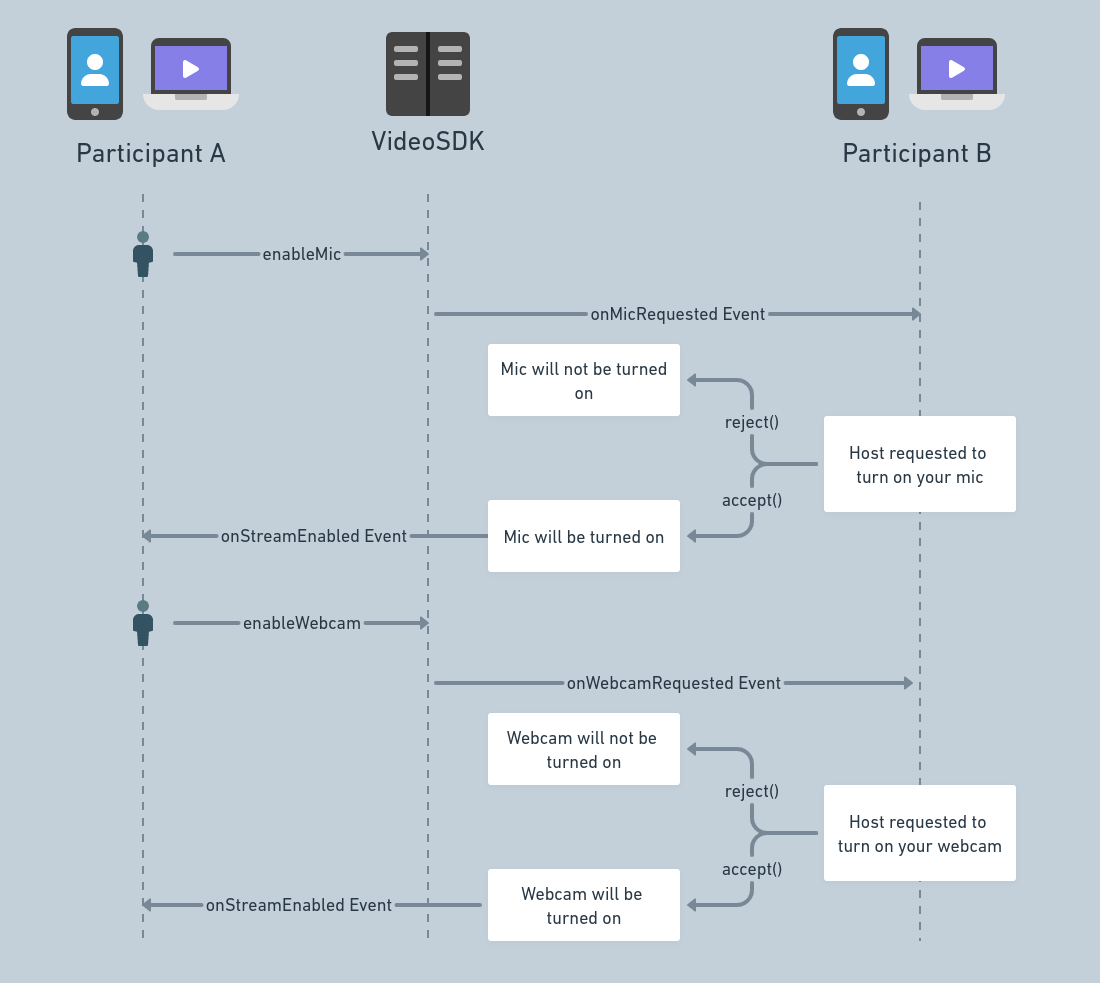
Before we discuss the methods and events associated with this functionality, here is how the flow would look like.
Methods
Each of these methods returns a Future that throws a VideoSDKError if the request is refused, so await it inside try/catch. They are not supported on an AI agent (participant.isAgent() is true), where they throw UnsupportedError.
enableMic()
-
If you wish to turn on the microphone of a participant, you will be calling the
enableMic()on theParticipantobject. -
When this method is called, the participant whose microphone is requested will receive the
Events.micRequestedevent with two callback functionsacceptandrejectwhich should be called based on decision made by the user. -
Example: Room is running with Participant A and Participant B. Now Participant A wants to unmute Mic of Participant B, so Participant A will use
enableMic()function to request Participant B, after that Participant B recieve theEvents.micRequestedevent, from there user can either accept or reject the incoming request.
enableCam()
-
If you wish to turn on the camera of a participant, you will be calling the
enableCam()on theParticipantobject. -
When this method is called, the participant whose camera is requested will receive the
Events.cameraRequestedevent with two callback functionsacceptandrejectwhich should be called based on decision made by the user. -
Example: Room is running with Participant A and Participant B. Now Participant A wants to Enable Cam of Participant B, so Participant A will use
enableCam()function to request Participant B, after that Participant B recieve theEvents.cameraRequestedevent, from there user can either accept or reject the incoming request.
Participant A is not told when the request is rejected. If it is accepted, everyone receives the new stream on the room's Events.streamEnabled event.
disableMic()
- If you wish to turn off the microphone of a participant, you will be calling the
disableMic()on theParticipantobject. - This will disable the microphone of the participant.
disableCam()
- If you wish to turn off the camera of a participant, you will be calling the
disableCam()on theParticipantobject. - This will disable the camera of the participant.
Example
import 'dart:developer';
import 'package:flutter/material.dart';
import 'package:videosdk/videosdk.dart';

class ParticipantTile extends StatefulWidget {
  final Participant participant;
  const ParticipantTile({super.key, required this.participant});

  @override
  State<ParticipantTile> createState() => _ParticipantTileState();
}

class _ParticipantTileState extends State<ParticipantTile> {

  // Sends one request and logs it if the SDK refuses it
  Future<void> sendRequest(Future<void> Function() request) async {
    try {
      await request();
    } on VideoSDKError catch (e) {
      log("Request failed: ${e.code} ${e.name}");
    }
  }

  @override
  Widget build(BuildContext context) {
    // AI agents do not support these requests
    if (widget.participant.isAgent()) return const SizedBox.shrink();
    return Column(
      children: [
        ElevatedButton(
          child: Text("Enable Mic"),
          onPressed: () => sendRequest(widget.participant.enableMic),
        ),
        ElevatedButton(
          child: Text("Disable Mic"),
          onPressed: () => sendRequest(widget.participant.disableMic),
        ),
        ElevatedButton(
          child: Text("Enable Cam"),
          onPressed: () => sendRequest(widget.participant.enableCam),
        ),
        ElevatedButton(
          child: Text("Disable Cam"),
          onPressed: () => sendRequest(widget.participant.disableCam),
        ),
      ],
    );
  }
}
Events
cameraRequested
This event will be emitted to the Participant B when any other Participant A requests to enable webcam of that participant (Participant B). This event handler will receieve following two entries in the Map<String, dynamic>:
accept()- Callback function to accept the request.reject()- Callback function to reject the request.
accept() and reject() return a Future, so await them inside try/catch.
micRequested
This event will be emitted to the Participant B when any other Participant A requests to enable mic of that participant (Participant B). This event handler will receieve following two entries in the Map<String, dynamic>:
accept()- Callback function to accept the request.reject()- Callback function to reject the request.
accept() and reject() return a Future, so await them inside try/catch.
Usage
import 'dart:developer';
import 'package:flutter/material.dart';
import 'package:videosdk/videosdk.dart';

class RoomScreen extends StatefulWidget {
  ...
}

class _RoomScreenState extends State<RoomScreen> {
  late Room room;

  @override
  void initState() {
    ...

    setupRoomEventListener();
  }

  @override
  Widget build(BuildContext context) {
    return YourRoomWidget();
  }

  void setupRoomEventListener() {
    //Event for mic request
    room.on(Events.micRequested, (_data) {
      log("_data => $_data");
      dynamic accept = _data['accept'];
      dynamic reject = _data['reject'];

      log("accept => $accept reject => $reject");

      // Mic Request Dialog. navigatorKey is the GlobalKey<NavigatorState>
      // passed to your MaterialApp.
      showDialog(
        context: navigatorKey.currentContext!,
        builder: (context) => AlertDialog(
          title: const Text("Mic requested?"),
          content: const Text("Do you want to turn on your mic? "),
          actions: [
            TextButton(
              onPressed: () async {
                Navigator.of(context).pop();
                try {
                  await reject();
                } catch (e) {
                  log("Could not answer the request: $e");
                }
              },
              child: const Text("Reject"),
            ),
            TextButton(
              onPressed: () async {
                Navigator.of(context).pop();
                try {
                  await accept();
                } catch (e) {
                  log("Could not answer the request: $e");
                }
              },
              child: const Text("Accept"),
            ),
          ],
        ),
      );
    });

    // Called when camera is requested
    room.on(Events.cameraRequested, (_data) {
      log("_data => $_data");
      dynamic accept = _data['accept'];
      dynamic reject = _data['reject'];

      log("accept => $accept reject => $reject");

      // camera Request Dialog
      showDialog(
        context: navigatorKey.currentContext!,
        builder: (context) => AlertDialog(
          title: const Text("Camera requested?"),
          content: const Text("Do you want to turn on your Camera? "),
          actions: [
            TextButton(
              onPressed: () async {
                Navigator.of(context).pop();
                try {
                  await reject();
                } catch (e) {
                  log("Could not answer the request: $e");
                }
              },
              child: const Text("Reject"),
            ),
            TextButton(
              onPressed: () async {
                Navigator.of(context).pop();
                try {
                  await accept();
                } catch (e) {
                  log("Could not answer the request: $e");
                }
              },
              child: const Text("Accept"),
            ),
          ],
        ),
      );
    });
  }
}
API Reference
The API references for all the methods and events utilised in this guide are provided below.
Got a Question?  Ask us on discord

