PubSub - Flutter
PubSub is a short acronym for Publish-Subscribe mechanism. This mechanism is used to send and recieve messages from a particular topic. As the name suggests, for someone to send a message, they have to specify the topic and the message which should be published and for someone to receive a message, they should be subscribed to that topic.
Here is a visual to better understand publish-subscribe mechanism.
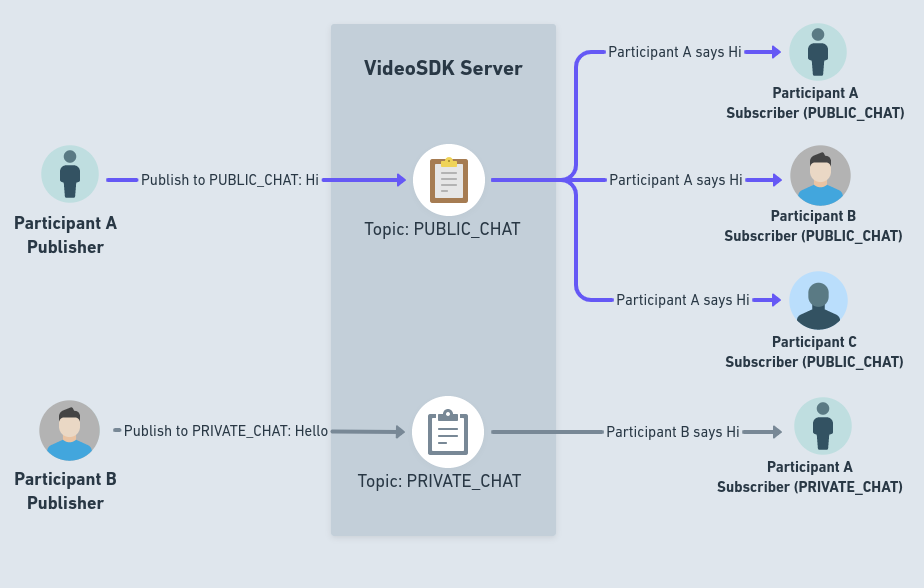
PubSub
In order to use PubSub in a room, VideoSDK provides the pubSub property on the Room object, which allows you to subscribe to any topic and publish to any topic, allowing you to pass on messages and instructions during the room easily.
PubSub calls need a joined room, so call them from your Events.roomJoined handler or later. publish(), subscribe() and unsubscribe() return a Future that throws a VideoSDKError when the SDK refuses the call. Called before the room is joined, they throw a VideoSDKError with code 3035. See Handling failures below and the Migration Guide.
publish()
- This method is used for publishing message of specific topic.
- This method can be accessed from the
pubSubfrom theRoom. - This method will accept following parameters as input:
topic: This will be the topic where the message will be published.message: This will be the actual message to be published. It has to be inStringformat.options: This is an object ofPubSubPublishOptionswhich specifies the options for publish.PubSubPublishOptionshas 2 properties.persist:persistoffered the option of keeping the message around for the duration of the session. Whenpersistis set totrue, that message will be retained for upcoming participants and will be available in VideoSDK Session Dashboard with.CSVformat after completion of session.sendOnly: If you want to send a message to specific participants, you can pass their respectiveparticipantIdin form ofList<String>. If you don't provide any IDs, the message will be sent to all participants by default. This is optional parameter.
payload: If you need to include additional information along with a message, you can pass here asMap<String, dynamic>. This is optional parameter. It comes afteroptions, so passoptionstoo when you send a payload.
- The returned
Futurethrows aVideoSDKErrorif the SDK refuses the message, for example4087(PUBSUB_PUBLISH_FAILED). A failure that happens afterpublish()has completed reaches onlyEvents.error, with code4087.
import 'package:flutter/material.dart';
import 'package:videosdk/videosdk.dart';

class RoomScreen extends StatefulWidget {
  ...
}

class _RoomScreenState extends State<RoomScreen> {
  late Room _room;

  @override
  void initState() {
    ...
  }

  @override
  Widget build(BuildContext context) {
    return Column(
      children:[
        //These will publish "Hello World!" on the "CHAT" topic
        ElevatedButton(
          onPressed:() async {
            try {
              await _room.pubSub.publish("CHAT", "Hello World!");
            } on VideoSDKError catch (e) {
              // Not sent — mark the message unsent or offer a retry here.
              debugPrint("Publish failed: ${e.code} ${e.name}");
            } catch (e) {
              // Anything else that went wrong.
              debugPrint("Publish failed: $e");
            }
          },
          child: const Text("Send Message"),
        ),
      ]
    );
  }
}
Receiving the messages
-
To subscribe to a topic, call
subscribe()with thetopicand aPubSubMessageListener. Pass the same listener object tounsubscribe()later. -
PubSubMessageListenertakes four optional callbacks:onMessageReceived(PubSubMessage message): a new message on the topic.onOldMessagesReceived(List<PubSubMessage> messages, PubSubHistoryInfo info): messages published withpersist: truebefore you subscribed.info.isLastistrueon the last delivery.onBatchReceived(List<PubSubMessage> messages): new messages delivered together.onMessageDrop(PubSubMessageDropInfo info): new messages dropped underRealtimeOverflow.DROP.info.droppedCountsays how many.
-
An optional third argument,
PubSubSubscribeOptions, controls delivery. A field you leave out takes the server's default:oldMessageLimit: how many stored messages to deliver.0skips them.realtimeOverflow:RealtimeOverflow.QUEUEorRealtimeOverflow.DROPfor new messages that arrive faster than your app takes them.maxQueue: the queue size forQUEUE. Not allowed withDROP.newMessageLimit: the most new messages delivered in one batch.
-
subscribe()returns nothing. Stored messages arrive ononOldMessagesReceived. -
Each listener is its own subscription, with its own options and its own copy of the stored messages. Subscribing the same listener to the same topic twice throws a
VideoSDKErrorwith code3073. -
Subscribe from your
Events.roomJoinedhandler, or later. -
Each message is a
PubSubMessagewhich will contain following properties:id: This is the unique id of the message.senderId: This represents theparticipantIdof the participant who send the message.senderName: This represents thedisplayNameof the participant who send the message.message: This will be the acatual message that was send.timestamp: The time the message was published, as theStringthe server sends.topic: This will be the name of the topic message was published to.payload: This will be the data that you have send with message.
Handling failures
publish(), subscribe() and unsubscribe() return a Future that throws when the call does not take effect. Dart cannot flag an unhandled one at compile time — an unawaited onPressed: () => room.pubSub.publish(...) turns a failure into a runtime async error. Give every call site a catch or a .catchError.
| Situation | What is thrown | Code |
|---|---|---|
Called before Events.roomJoined, or after Events.roomLeft | VideoSDKError | 3035 |
| Called while the room reconnects | VideoSDKError (ERROR_ROOM_RECONNECTING) | 3065 |
subscribe() with a listener already subscribed to the topic | VideoSDKError (ERROR_INVALID_PARAMETER) | 3073 |
publish() was rejected | VideoSDKError (PUBSUB_PUBLISH_FAILED) | 4087 |
subscribe() was rejected | VideoSDKError (PUBSUB_SUBSCRIBE_FAILED) | 4088 |
unsubscribe() was rejected | VideoSDKError (PUBSUB_UNSUBSCRIBE_FAILED) | 4089 |
VideoSDKError carries code, name and message. Branch on the code.
try {
  await room.pubSub.publish("CHAT", text);
} on VideoSDKError catch (e) {
  switch (e.code) {
    case 3035:
      showToast("Join the room before publishing");
    case 3065:
      showToast("Reconnecting — try again shortly");
    default:
      markUnsent(id, e.message);
  }
} catch (e) {
  // Anything else that went wrong.
  showToast("Could not send the message");
}
A failure that throws VideoSDKError can also reach Events.error, with the same code, name and message. Catch to handle one call; listen on the event for centralized logging.
A few things behave differently from what you might expect:
- A failed
subscribe()leaves nothing behind. Your listener is not registered, so no messages arrive for that topic. unsubscribe()detaches your listener before anything that can throw, so adispose()teardown always completes. Telling the server needs a joined room. AfterEvents.roomLeftthat part throws aVideoSDKErrorwith code3035, so add a.catchError()to the call inState.dispose().- Not every failure can throw. A failure that happens after the call has completed, such as a message that could not be sent after
publish()returned, or a subscription that failed aftersubscribe()returned, reaches you onEvents.erroronly, with code4087or4088. Keep that listener if your UI shows message or subscription state.
Example
import 'package:flutter/material.dart';
import 'package:videosdk/videosdk.dart';

class ChatView extends StatefulWidget {
  final Room room;
  ...
}

class _ChatViewState extends State<ChatView> {

  // Every message received on the 'CHAT' topic
  final List<PubSubMessage> messages = [];

  // One listener object, passed to both subscribe() and unsubscribe()
  late final PubSubMessageListener chatListener = PubSubMessageListener(
    onMessageReceived: messageHandler,
    onOldMessagesReceived: (oldMessages, info) {
      if (mounted) {
        setState(() => messages.insertAll(0, oldMessages));
      }
    },
  );

  @override
  void initState() {
    ...

    // Subscribing 'CHAT' Topic. Show ChatView after Events.roomJoined,
    // so the room is joined by the time it subscribes.
    subscribeToChat();
  }

  Future<void> subscribeToChat() async {
    try {
      await widget.room.pubSub.subscribe("CHAT", chatListener);
    } catch (e) {
      // Called from initState(), which cannot await, so failures are caught here.
      debugPrint("Subscribe failed: $e");
    }
  }

  //Handler which will be called for every new message on the topic
  void messageHandler(PubSubMessage message) {
    if (mounted) {
      setState(() => messages.add(message));
    }
  }

  @override
  Widget build(BuildContext context) {
    return Column(
      children:[
        Expanded(
          child: SingleChildScrollView(
            reverse: true,
            child: Column(
              children: messages
                  .map(
                    (message) => Text(
                      message.message
                    ),
                  )
                  .toList(),
            ),
          ),
        ),
      ]
    );
  }

  @override
  void dispose() {
    // Unsubscribe. dispose() cannot await, so the failure is logged instead.
    widget.room.pubSub
        .unsubscribe("CHAT", chatListener)
        .catchError((Object e) => debugPrint("Unsubscribe failed: $e"));
    super.dispose();
  }
}
Applications of PubSub
Common uses of PubSub in a room:
Chat: You can utilise this to develop various Chat features, such as Private Chat and Group Chat. You can follow our chat integration guide here.Raise Hand: You can allow attendees to raise their hands at any time during the room, informing everyone else that someone has done so.Layout Switching: You can change the room's layout for every participant at once during the room, such as from Grid layout to Spotlight or Grid Layout to Sidebar Layout, etc.Poll: You may make polls, let users respond to them, and display the results at the end of a poll.Question Answer Session: You can also design interactive functionality that is question-and-answer based.
Downloading PubSub Messages
All the messages from the PubSub which were published with persist : true and can be downloaded as an .csv file. This file will be available in the VideoSDK dashboard as well as throught the Sessions API.
API Reference
The API references for all the methods and events utilised in this guide are provided below.
Got a Question?  Ask us on discord

