What is SurfaceViewRenderer?
SurfaceViewRenderer displays a video track on a SurfaceView. VideoSDK's VideoView extends it and manages it for you.
Render the video of a participant with VideoView, not with your own SurfaceViewRenderer. The track of a remote participant's RTCStream can be one whose addSink() does nothing, so a SurfaceViewRenderer attached with addSink() can stay black.
Here's the lifecycle of a SurfaceViewRenderer:
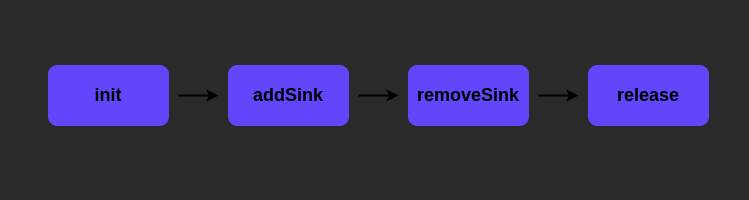
In order:
-
Call
init()after you create the renderer and before you use it. It starts the render thread. -
Call
addSink()on theVideoTrackyou want to show, passing the renderer. -
Call
removeSink()on that track, passing the renderer, when you're done showing the video. -
Call
release()last so the render thread stops. Call it before the activity is destroyed, and before you callinit()again.
Common mistakes
1. Not initializing the renderer
The render thread never starts, so the view stays black.
2. Initializing it again without releasing it
If you call init() again without calling release() first, you get this error:
java.lang.IllegalStateException: svrParticipant Already initialized
        at videosdk.org.webrtc.EglRenderer.init(EglRenderer.java:194)
3. Two videos on the same renderer
If you call addSink() with the same SurfaceViewRenderer for a second track without calling removeSink() for the first, both videos draw on it and flicker, like this:
VideoView does all of this for you. Use it instead of SurfaceViewRenderer.
VideoView
VideoView renders live video and sets up and releases the renderer for you.
VideoView extends videosdk.org.webrtc.SurfaceViewRenderer. Import VideoTrack and the other WebRTC types you use with it from videosdk.org.webrtc, not from org.webrtc.
Methods
-
addTrack(videoTrack: VideoTrack?) -
addTrackrenders the video track you pass. Pass thetrackof aRTCStreamwhosekindisMediaType.VIDEOorMediaType.SHARE, or thetrackof a camera track fromVideoSDK.createCameraVideoTrack()to preview the camera before you join. Cast either one toVideoTrack, for examplestream.track as? VideoTrack. Anulltrack is ignored. Adding the track of the participant that the view already shows does nothing, so you can call it again safely. CallremoveTrack()before you add another participant's track. Your own camera is shown in oneVideoViewat a time. If you add your video track to a secondVideoView, the first one stops updating. -
removeTrack() -
removeTrackstops showing the current track. The view stays usable and can take another track, so call it when a recycled tile moves to another participant. -
releaseSurfaceViewRenderer() - Call
releaseSurfaceViewRendereronce, before the activity is destroyed or in a ComposeDisposableEffect. It also removes the track, so callingremoveTrack()first is optional. The view can't render again afterwards. Don't call therelease()method thatVideoViewinherits fromSurfaceViewRenderer: it can deadlock while frames are still being drawn. -
setFrameSink(sink: FrameSink) -
setFrameSinkhands the frames this view would draw to your ownFrameSink(fromlive.videosdk.rtc.android.render) instead. Call it beforeaddTrack(). Today only the local screen-share preview reaches your sink. Your own camera and remote video are drawn directly and never reach it. -
attachLocalPreview() -
attachLocalPreviewdraws the local camera preview, with video effects applied, into a view that has no track, such as on a pre-call screen. It has no effect unless video effects are on, which you set withVideoSDK.setVideoEffects(). See Video Effects. Only one view can show the local preview: attaching another view replaces the first. -
detachLocalPreview() -
detachLocalPreviewstops drawing the local camera preview into the view.removeTrack()andreleaseSurfaceViewRenderer()also do this. -
setMirror(mirror: Boolean) -
setMirror(true)flips the video horizontally, as a front-camera self view is usually shown. -
setScalingType(scalingType: RendererCommon.ScalingType) -
setScalingTypesets how the video fits the view:SCALE_ASPECT_FITletterboxes it,SCALE_ASPECT_FILLcrops it. ImportRendererCommonfromvideosdk.org.webrtc.
On your own camera, setMirror() and setScalingType() apply only in a room without video effects. The pre-call preview and the effects preview ignore them.
How to use VideoView ?
Layout
<live.videosdk.rtc.android.VideoView
  android:id="@+id/participantView"
  android:layout_width="match_parent"
  android:layout_height="match_parent"
/>
Initialising and adding video track
import videosdk.org.webrtc.VideoTrack

val track = stream.track as? VideoTrack
participantView.addTrack(track)
removeTrack
participantView.removeTrack()
release
override fun onDestroy() {
        participantView.releaseSurfaceViewRenderer()
        super.onDestroy()
}
Got a Question?  Ask us on discord

