Toggle Remote Participant Media - Android
When hosting a room, the host may need to ask a participant to turn on their mic or camera, or turn them off.
The participant who controls other participants' mic and camera must have the allow_mod permission in their token. To know more about permissions visit here.
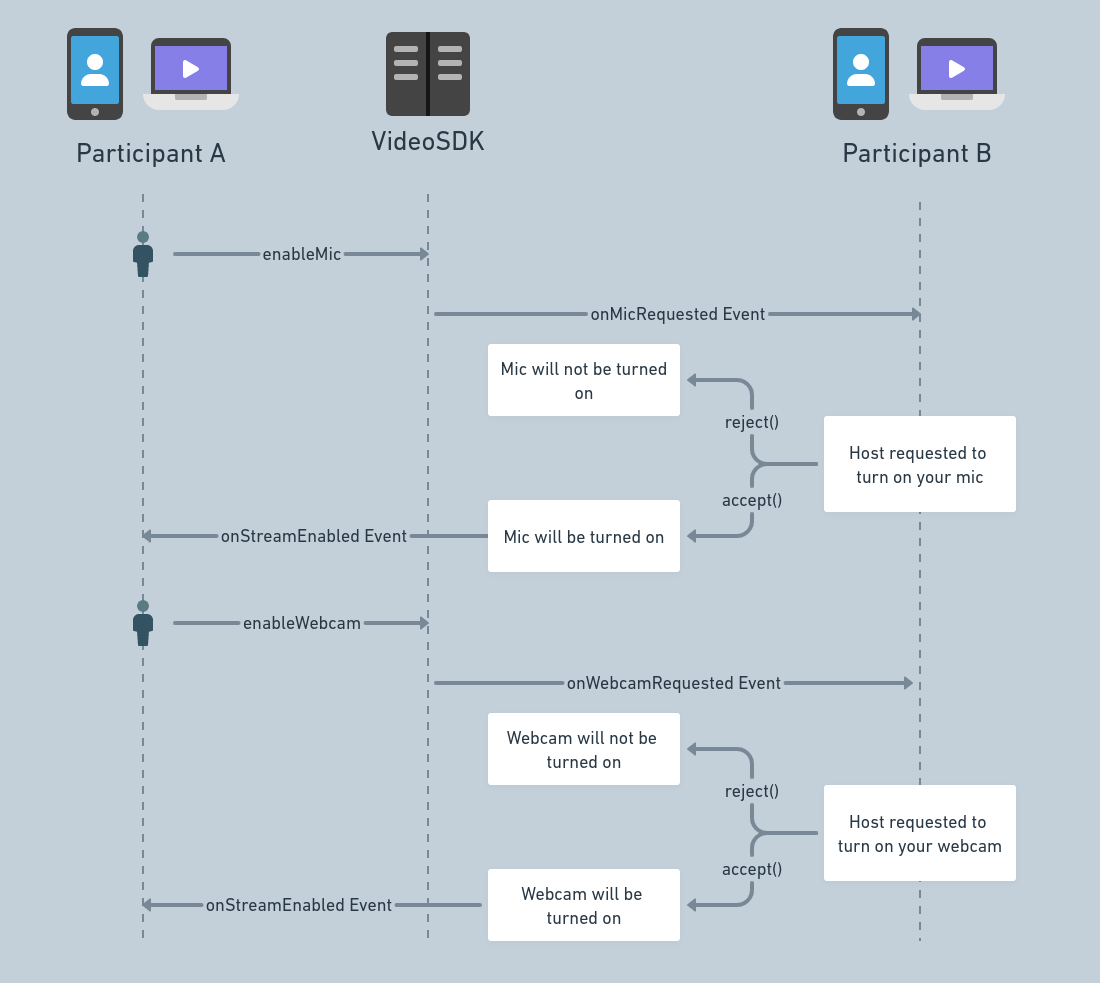
Before we discuss the methods and events associated with this functionality, here is how the flow looks.
Methods
All four methods are suspend functions on the remote Participant, so call them from a coroutine. disableMic() and disableCam() throw a VideoSDKException when the server refuses the request. Called before join(), or while the room is reconnecting, all four report 3035 or 3065 on onError and return without throwing. Called while a join is still running, they wait for the join to finish first.
enableMic()
-
Call
participant.enableMic()to ask that participant to turn their microphone on. Nothing changes until they accept. -
The participant receives
onMicRequestedwith theparticipantIdof who asked and aMicRequestListener. Their app callsaccept()orreject()on it, based on the user's choice. -
Example: Participant A calls
enableMic()on Participant B. Participant B receivesonMicRequestedand accepts or rejects. If B accepts, B's audio stream appears for everyone.
enableCam()
-
Call
participant.enableCam()to ask that participant to turn their camera on. Nothing changes until they accept. -
The participant receives
onWebcamRequestedwith theparticipantIdof who asked and aWebcamRequestListener. Their app callsaccept()orreject()on it, based on the user's choice. -
Example: Participant A calls
enableCam()on Participant B. Participant B receivesonWebcamRequestedand accepts or rejects. If B accepts, B's video stream appears for everyone.
disableMic()
- Call
participant.disableMic()to turn that participant's microphone off. They are not asked: their audio stream stops for everyone.
disableCam()
- Call
participant.disableCam()to turn that participant's camera off. They are not asked: their video stream stops for everyone.
Example
btnEnableCam!!.setOnClickListener { _: View? ->
  lifecycleScope.launch {
    try {
      // This will emit an event called "onWebcamRequested" to that particular participant
      participant!!.enableCam()
    } catch (e: VideoSDKException) {
      Log.d("VideoSDK", "enableCam failed: ${e.code} ${e.message}")
    }
  }
}

btnEnableMic!!.setOnClickListener { _: View? ->
  lifecycleScope.launch {
    try {
      // This will emit an event called "onMicRequested" to that particular participant
      participant!!.enableMic()
    } catch (e: VideoSDKException) {
      Log.d("VideoSDK", "enableMic failed: ${e.code} ${e.message}")
    }
  }
}

btnDisableCam!!.setOnClickListener { _: View? ->
  lifecycleScope.launch {
    try {
      // This will disable the camera of that particular participant
      participant!!.disableCam()
    } catch (e: VideoSDKException) {
      Log.d("VideoSDK", "disableCam failed: ${e.code} ${e.message}")
    }
  }
}

btnDisableMic!!.setOnClickListener { _: View? ->
  lifecycleScope.launch {
    try {
      // This will disable the mic of that particular participant
      participant!!.disableMic()
    } catch (e: VideoSDKException) {
      Log.d("VideoSDK", "disableMic failed: ${e.code} ${e.message}")
    }
  }
}
Events
onWebcamRequested
Called on Participant B's RoomEventListener when Participant A calls enableCam() on B. It receives:
participantId: the ID of the participant who asked.listener: aWebcamRequestListener. Callaccept()to turn the camera on, orreject()to decline.
onMicRequested
Called on Participant B's RoomEventListener when Participant A calls enableMic() on B. It receives:
participantId: the ID of the participant who asked.listener: aMicRequestListener. Callaccept()to turn the microphone on, orreject()to decline.
reject() is handled on that participant's device only. The participant who sent the request is not notified. After accept(), the device is on once onStreamEnabled fires for the local participant.
Usage
override fun onMicRequested(participantId: String, listener: MicRequestListener) {
  // turn the microphone on
  listener.accept()

  // or decline
  listener.reject()
}

override fun onWebcamRequested(participantId: String, listener: WebcamRequestListener) {
  // turn the camera on
  listener.accept()

  // or decline
  listener.reject()
}
API Reference
The API references for all the methods and events utilised in this guide are provided below.
Got a Question?  Ask us on discord

